How to change Single Photo View slug?
Default slug is www.site.com/contest-photo/123/
To change it go to WP Foto Vote Settings => Single tab and edit “Single photo url prefix?” from “contest-photo” to for example “competitor“.
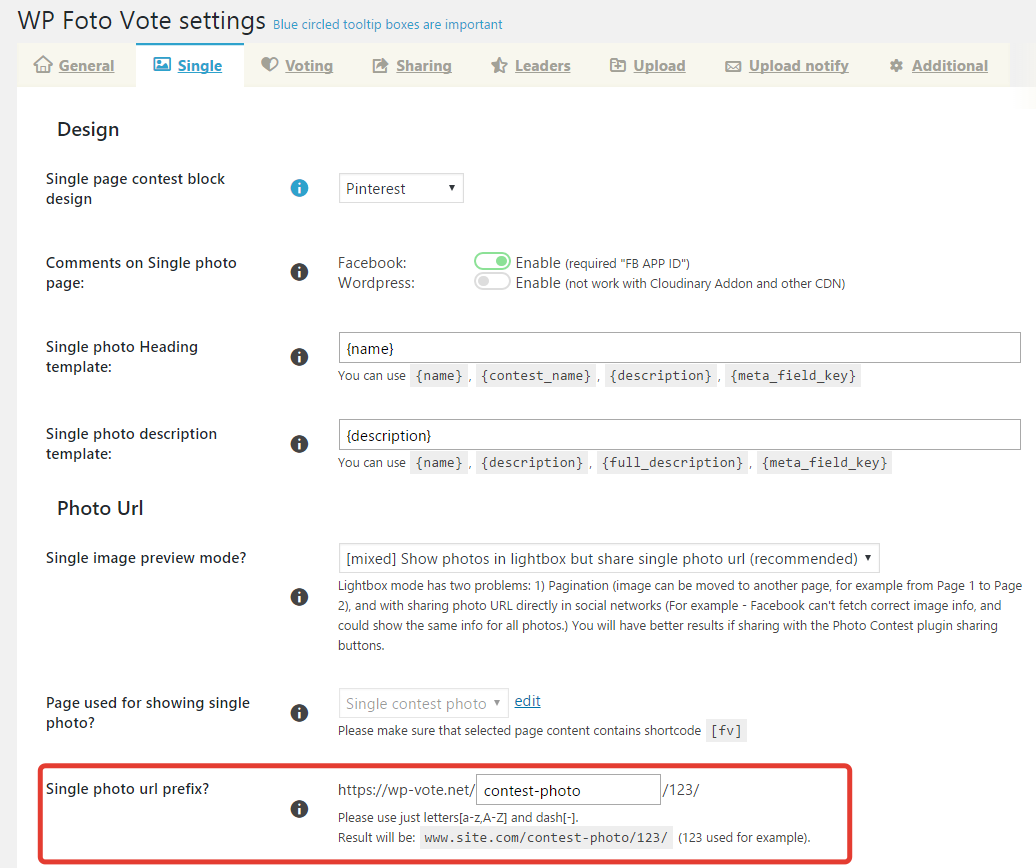
After go to Settings (wordpress global) => Permalinks and click Save (in order to regenerate the permalinks, else nothing will work).
How to create a Single View page?
Note: this below actions required just if you deleted Single View page, else all these actions are done automatically by plugin at the installation/update.
Please follow instructions in this order:
- Create a new page (call it for example “Single Contest Photo”) and paste the shortcode
[[fv]]into content. - Go to Photo contest => Settings => Single photo and select this page in option “Page used for showing single photo?”
Example: https://yadi.sk/i/Yh9do1k-qJXEf - The recommended value for option “Open contest image in a new page?” are “Show photos in lightbox but share single photo URL (recommended)”.
- Go to Settings => Permalinks and click Save (in order to regenerate the permalinks, else nothing will work).
Note: if you change the option “Page used for showing single photo?” you will need to repeat this action.
Last edited 29/04/2017


Leave A Comment?